We value your privacy

Only strictly necessary cookies until you opt in — see our Cookie Policy.

PYRAMYD

Workspace hub · Home

Start each day knowing what changed and what needs you

One brief across the four hubs, one inbox for every alert, signal, and finding about what you track, and a graph of the companies, products, and markets you follow.

Included in every plan: Starter, Growth, and Enterprise. See pricing

What teams do with Home

Four jobs, four real use cases

  1. Know what changed before your first meeting

    Competitive intelligence lead · Marketing

    It is Monday at Contoso, and the CI lead has a few minutes before the leadership stand-up to catch up on the week’s competitor activity.

    1. Open Workspace on the Overview.
    2. Read What changed: 3 risk reviews and 56 competitor events this week.
    3. Check Needs you for anything waiting on her.
    4. Pick up last week’s work from Jump back in.
    • One brief across the four hubs
    • What needs you, first
    • Back to your last work in one click

    Reads about 43,000 signals and 70,000 articles about tracked records · production count and estimate, 30 Oct 2026

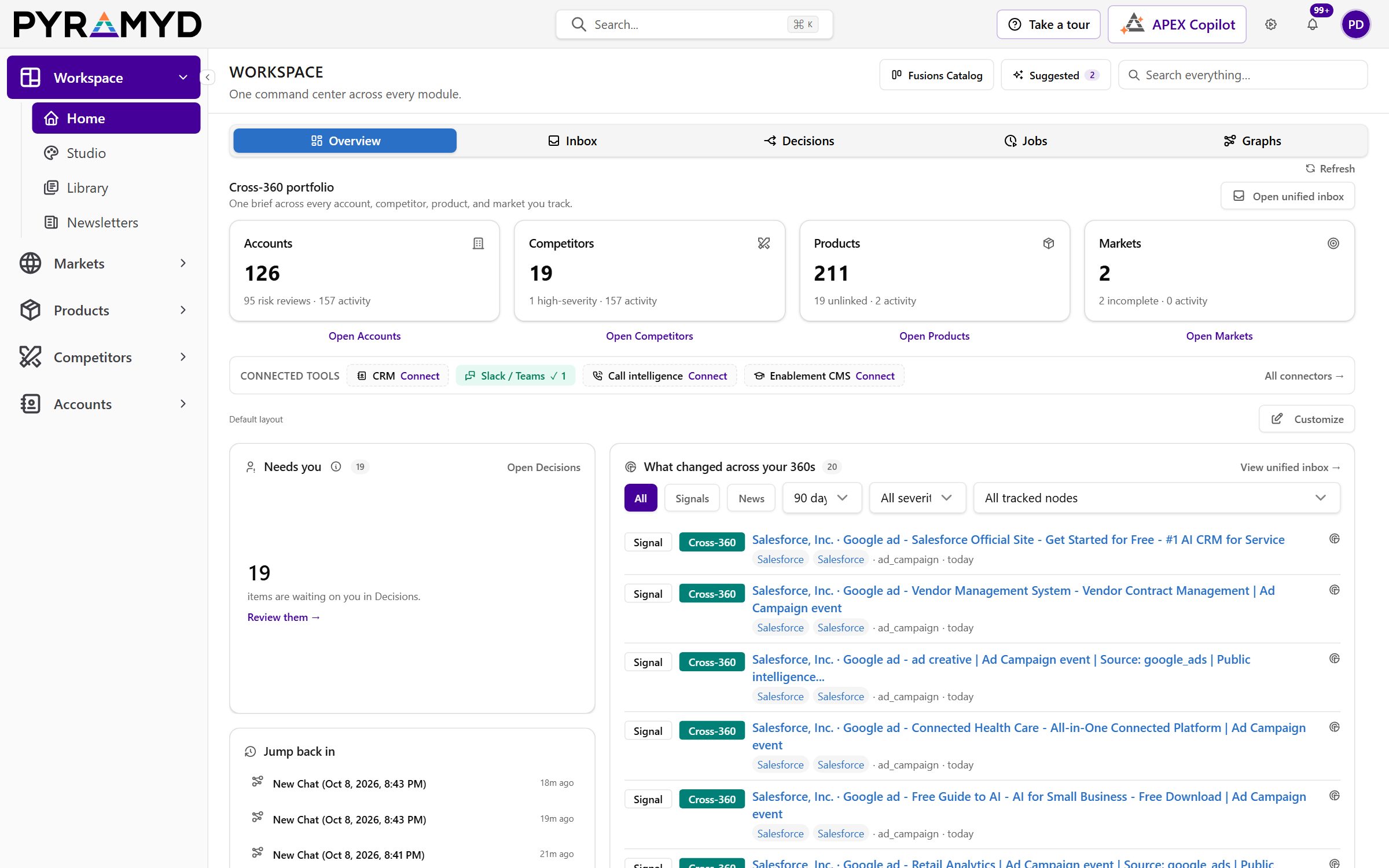
    Workspace Home: counts of tracked markets, products, competitors, and accounts, connected tools, items waiting for a decision, the boards and graphs to jump back into, and what changed across the 360s.
    Home: one brief across the accounts, competitors, products, and markets you track. Sample data in a demo organization, captured from the live app on 9 November 2026.
  2. Catch news about your accounts the day it lands

    Customer success manager · Customer Success

    A Fabrikam customer success manager has renewal calls today and needs to know whether anything happened at those accounts overnight.

    1. Open the alert from the bell; it lands in the Inbox.
    2. Filter the Inbox by type to the alerts and signals about tracked accounts.
    3. Read each one in the detail pane, newest first, before the first call.
    • One list for alerts, signals, and findings
    • Filters by type and category
    • Findings with the signals they cite
  3. See a prospect’s ecosystem before the call

    Account executive · Sales

    Before a first call with Northwind, a Contoso account executive wants to know which of Northwind’s vendors and partners already work with Contoso.

    1. Start a graph and add Northwind by search.
    2. Expand its links in one click to pull in its vendors and partners.
    3. Click any company on the graph to inspect it, and remove the ones that do not matter.
    4. Share the graph with the account team.
    • Build a map by search
    • Expand links in one click
    • Share with only you, your team, or the Organization

    About 11.96 million relationships to expand into · production estimate, 3 Nov 2026

  4. See who leads on a feature before you plan yours

    Product manager · Product

    Acme’s product manager is scoping single sign-on for next quarter and wants to know which vendors lead on it, and how many reviews back each score.

    1. Open the feature explorer from an empty graph.
    2. Filter the picker to single sign-on and three vendors.
    3. Hide every column except product, capability, feature, and feature score.
    4. Read who leads, with the review count behind each score.
    • Feature-level comparison across vendors
    • Scores and review counts side by side
    • Six filters on one table

    Searches about 3.8 million vendor feature rows, about 1.8 million of them scored · production estimate, 3 Nov 2026

Also in Home

More of what Home does for you

  • Decisions QueueAccept, dismiss, or track each suggested decision with its evidence and subject beside it.
  • Feature Picker Filters and ColumnsSix filters on one feature table, with clear row counts and a one-click reset.
  • Graph Node InspectorClick a company or product on your graph to see what it is, expand its links, or remove it.
  • Background Job MonitorThe build and research jobs running or finished for you, with status and timing, and APEX on hand to explain one.
  • Signal Detail and SharingOpen any signal to triage it, note your takeaway for yourself or your organization, share it to Slack or Teams, and, with Accounts, sort the inbox by revenue at stake.
  • Set Up From Your WebsiteA new organization drafts its profile, products, competitors, and sources from its own website: it shows which pages it reads and the most it can cost first, and every draft waits for review before it is saved.

See all capabilities

The evidence behind every Home

relationships your graph can expand into
11.96 million
About; production estimate, 3 Nov 2026
vendor feature rows to compare, about 1.8 million of them scored
3.8 million
About; production estimate, 3 Nov 2026
articles about tracked records read for What changed
70,000
About; production estimate, 30 Oct 2026

Start every day from one brief

Home comes with Workspace, included in every plan: Starter, Growth, and Enterprise.