We value your privacy

Only strictly necessary cookies until you opt in — see our Cookie Policy.

PYRAMYD

Cross-hub · The Platform

Check where an answer came from before you use it

Every answer in PYRAMYD starts from one Product Graph: the software market PYRAMYD keeps, next to your own records. APEX keeps the sources it cites, and values show where they came from, so you can check an answer before it reaches a buyer or your CEO.

See the Data Foundation

How an answer stays grounded

Four parts, one graph under all of them

  1. 1 · Data Foundation

    The software market, already researched

    250K+ products, 2.4M+ buyer reviews, and about 1.44 million companies, with categories, industries, countries, and roles researched on the same tabs.

    See the Data Foundation
  2. 2 · Signals

    New moves, each with its source

    Signals come from a catalog of 2,000+ sources, plus the watches you add, each kept with its source.

    See the signal engine
  3. 3 · Product Graph

    Real links between records

    About 12 million connections link your product to its market, rivals, and buyers, so APEX follows real links, not only text that looks similar.

    See the Product Graph
  4. 4 · APEX

    Answers with their sources

    12 discipline agents answer on every page, and APEX keeps every source a chat cites in one Sources tab.

    See APEX agents

What teams do with the Platform

Four checks, four real use cases

  1. Fix a wrong claim before the next call

    Sales engineer · Sales

    Two days before Contoso’s technical call, the sales engineer spots an integration on the battlecard that the rival no longer offers.

    1. Open the source control beside the value: it shows where the value came from, when it was captured, and how fresh it is.
    2. Choose Report a data issue, pick Wrong value, and add a note.
    3. Send the report; it reaches the PYRAMYD data team for a fix.
    • Source and capture date beside values
    • Freshness at a glance
    • Report a wrong value in two clicks
  2. Bring the comparison and the sources behind it

    Product manager · Product

    Fabrikam’s product manager has to compare three products in a category before the prioritization review, and show where each fact came from.

    1. Open APEX and switch the view to Canvas.
    2. Ask APEX to compare the three products; the comparison lands as a table in the Sheets tab.
    3. Open Sources to check every source the chat cited before the table goes into the review.
    • Tables, charts, and graphs in their own tabs
    • Every source of the chat in one Sources tab
    • Notes and files beside the chat

    Nine Canvas tabs, including a Sources tab of every citation · production code, 30 Oct 2026

  3. Find the rivals missing from your tracker

    Competitive intelligence analyst · Marketing

    Acme’s analyst suspects the competitor tracker misses smaller rivals that sell to the same buyers.

    1. Ask APEX to map the competitive landscape around Acme’s main rival.
    2. Open the Graph tab of the APEX Canvas and find the companies in a similar position.
    3. Ask how two of them connect, and read the shared investors and partners on the path.
    • Landscape maps
    • Paths between two companies
    • Only links that exist; APEX does not invent them

    Follows about 12 million connections · production estimate, 30 Oct 2026

  4. Quote a review score with the count behind it

    Product marketing manager · Marketing

    Northwind’s launch slide sets its review score beside two rivals’, and sellers will be asked how many reviews stand behind each one.

    1. Open each product in Products › Product 360, or open the rival’s battlecard.
    2. Read the review score on one 0-100 scale and the count from each review site.
    3. Put each score on the slide with its count; a review set shared by three sites is counted once, never three times.
    • Review counts per site and in total
    • One review score on a single scale
    • No setup: the data is gathered for you

    117,492 products carry a review score · production, 3 Nov 2026

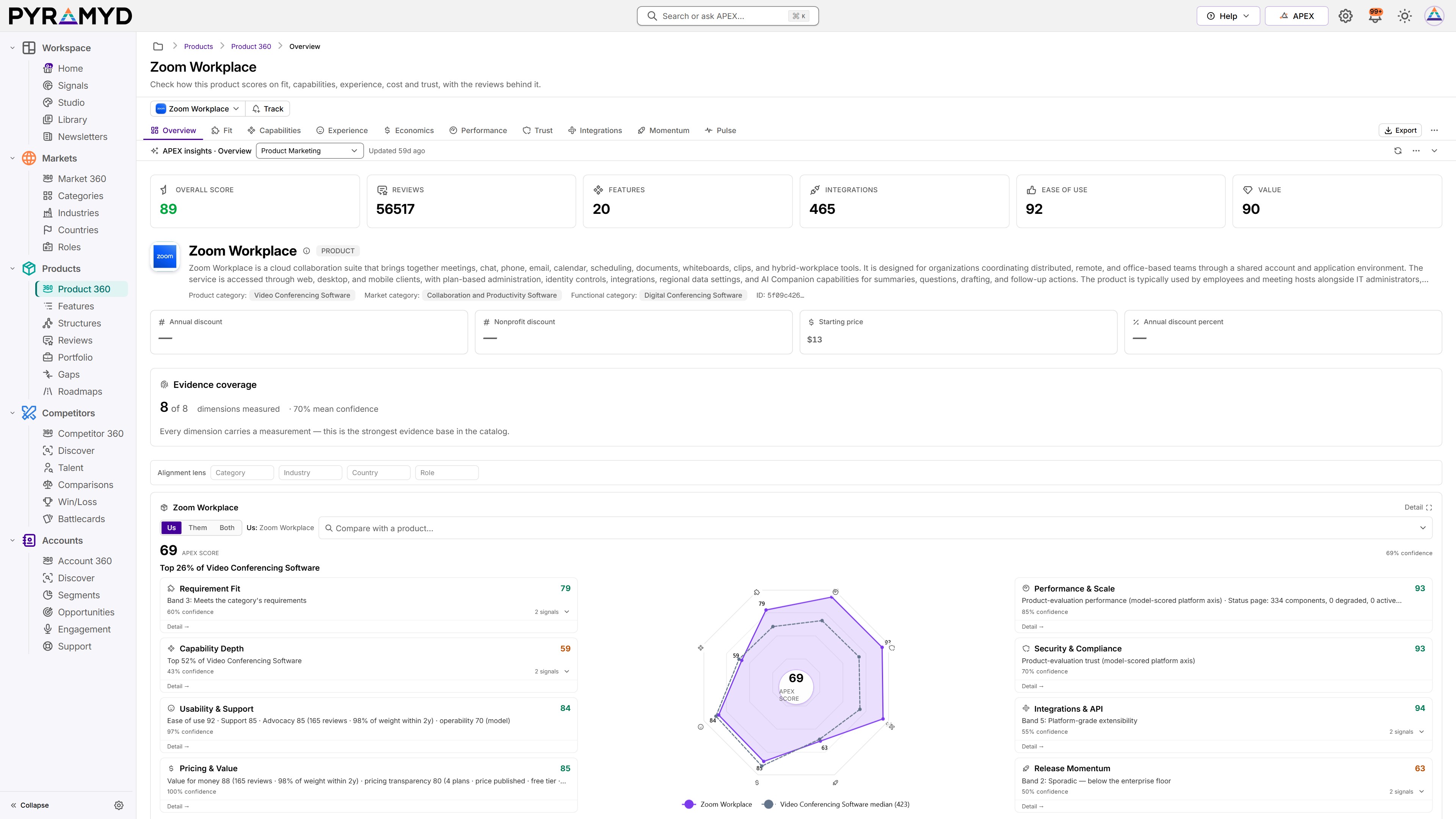
    Product 360 on Zoom Workplace: an experience score of 89 from reviews, 635,923 reviews on review sites, 20 features, 465 integrations, an entry price of $13.33 across 4 plans, the problems it solves, its category path to Video Conferencing Software, evidence on 6 of the 8 dimensions, and its score on each dimension against the other products in its category.
    Product 360 on Zoom Workplace: the score, the reviews behind it, and each dimension against the other products in its category. Captured from the live app on 9 November 2026.

Also on the Platform

More of what holds every page together

  • Approval before changesDeletes, bulk updates, and new connections wait until a person approves them in chat.
  • Web search with sourcesAsk about this week’s news and APEX answers from the open web with cited sources; switch it off to keep answers to PYRAMYD data.
  • Record cardsOpen any record, from a contact to a contract, in one card over the page you are on.
  • Access and share linksShare a record you own with named people, teams, or a link, as viewer, commenter, or editor.
  • 360 export and sharingExport a Competitor, Account, or Product 360 as a branded deck or PDF, or share a read-only link that expires after 90 days.
  • Notification bellSignal alerts, RFP assignments, mentions, and share-link opens in one bell, with an unread count.
  • Tracked portfolioStart the week on the competitors, products, or accounts you track, with what needs attention first.
  • Connections to your toolsConnect your own systems by OAuth, API key, MCP server, or webhook, and choose who can use each connection.

And 3 more: see all capabilities

What every answer starts from

software products
250K+
Production count
buyer reviews
2.4M+
Production count
companies
1.44 million
About; production estimate, 30 Oct 2026
connections between records
12 million
About; production estimate, 30 Oct 2026

See an answer and its sources on your own product

Bring a real question to a demo. We will answer it across your market, competitors, and accounts, and open the sources behind it.