Only strictly necessary cookies until you opt in — see our Strictly necessary cookies run the site. With your consent we also use functional, analytics, and marketing cookies — nothing non-essential loads until you opt in. See our Cookie Policy.
Account 360 puts each customer’s churn risk and its reasons beside what the customer keeps telling you and what its own staff say about their tools, then drafts the quarterly review from it.
Narrated walkthrough, about 74 seconds. Turn on narration to hear it; the captions on the board carry the same words.
Read the six steps
Pick an account. Pick an account you track, here the example Fernmoor Freight. Its Account 360 opens on ten tabs: Overview, one for each of its eight dimensions, and Pulse.
What it reads. It reads public evidence: company profile, technology, employee reviews, and news. Your CRM adds renewal, health, NPS, contract value, activity, and deals, which stay private to your organization.
Eight dimensions. Eight dimensions are scored 0 to 100 and roll up into one Account Score. Without evidence, a dimension shows no score, not a low one. People needs your CRM.
People and tools. Then people and tools: public contacts grouped by function and seniority, and the tools the account runs, with what its employees say about each, unhappiest first.
Churn risk and plays. With your CRM linked, churn risk here reads 60: renewal in 12 days, amber health, and a detractor NPS. Plays follow, ranked by urgency, each naming the dimension behind it.
Written down, then checked. PYRAMYD writes the churn call down with its probability and drivers, and checks it after 90 days. The account lands in Needs attention, ready for a QBR and an export.
What teams do with Account 360
Four jobs, four real use cases
1
Know which renewal is at risk, and the play to save it
Customer success manager · Customer Success
On Monday morning, the customer success manager needs to know which of her accounts to call first.
Open Northwind’s Overview in Account 360, with the account linked to your CRM.
Read its churn risk, 74, and the reasons behind it: falling usage and three angry tickets.
Take the recommended retention play and book a call with the sponsor that week.
Record what the play achieved, so every churn call keeps a track record.
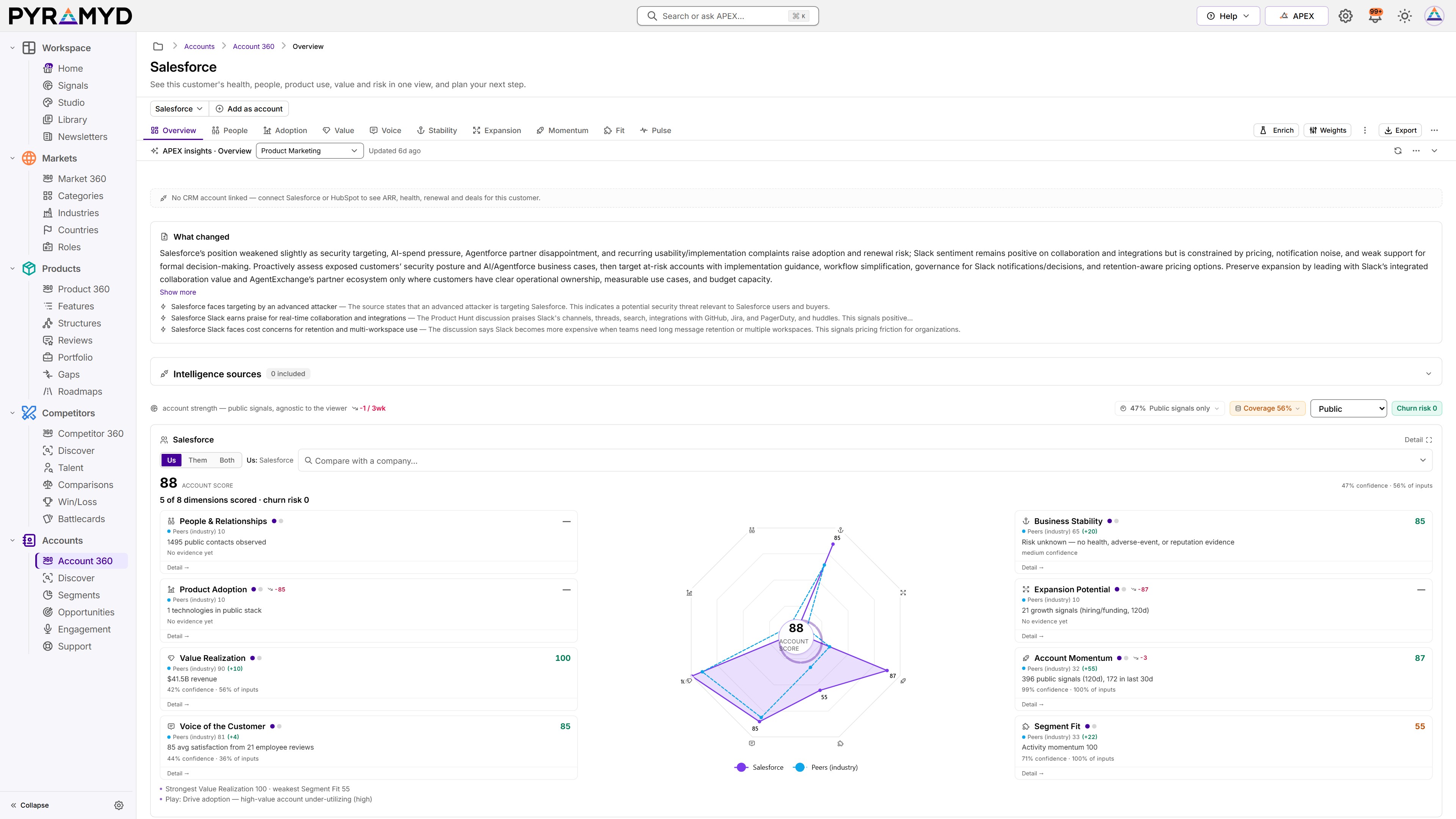
Account 360 on Salesforce: what changed, from public signals, and the account score against industry peers, before any of your own data is added. Captured from the live app on 23 October 2026.
2
Hear what customers keep asking for, in their words
Product manager · Product
The product manager is writing the spec for the reporting feature and wants to know what customers actually ask for.
Open the feedback themes across all your accounts, by feature.
Filter to reporting: 62 mentions of missing scheduled exports, across surveys and tickets.
Shortlisted Tools and Site ScoresSee the tools the account’s staff shortlisted in public reviews, dated and with a confidence, and each review site’s score for the tools they run.
Account recordTen tabs per account, with track, enrich, and refresh in one toolbar, and export to a deck, a PDF, or a link.
Company profileHeadquarters, size, revenue, funding, and valuation, with a source behind every tile.
Contacts and industriesThe buying committee by function and seniority, a page per person, and the industries and countries the account works in.
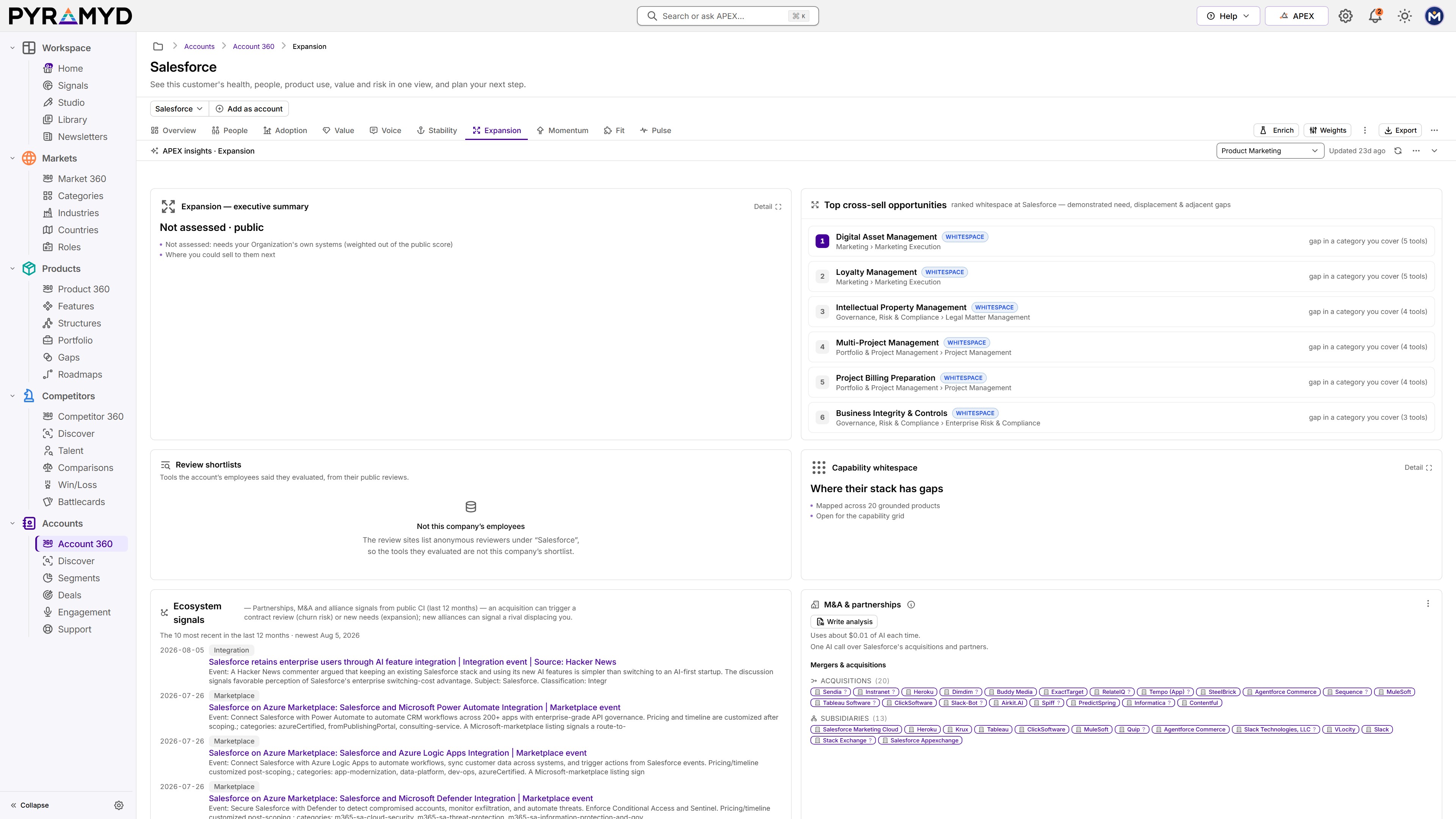
Expansion readoutCross-sell openings from stack gaps, rival tools the account dislikes, and its public buying signals.
Products in useThe software an account runs, found from detected technologies and its employees’ own reviews.
Technology stackThe technologies detected at an account, matched to the products it uses.
News and signalsNews and signals for one account on its Pulse tab, by category, each with its source.
Customers boardOn your Home board: ICP segments, how buyers score you over time, and deals closing soon.
Expansion tab. Cross-sell whitespace ranked for the account, beside its ecosystem signals and its acquisitions. Captured from the live app on 9 November 2026.
The evidence behind every account
public reviews, including what an account’s staff say about their tools