PYRAMYD
Solutions

Studio

GA

Studio Sheets

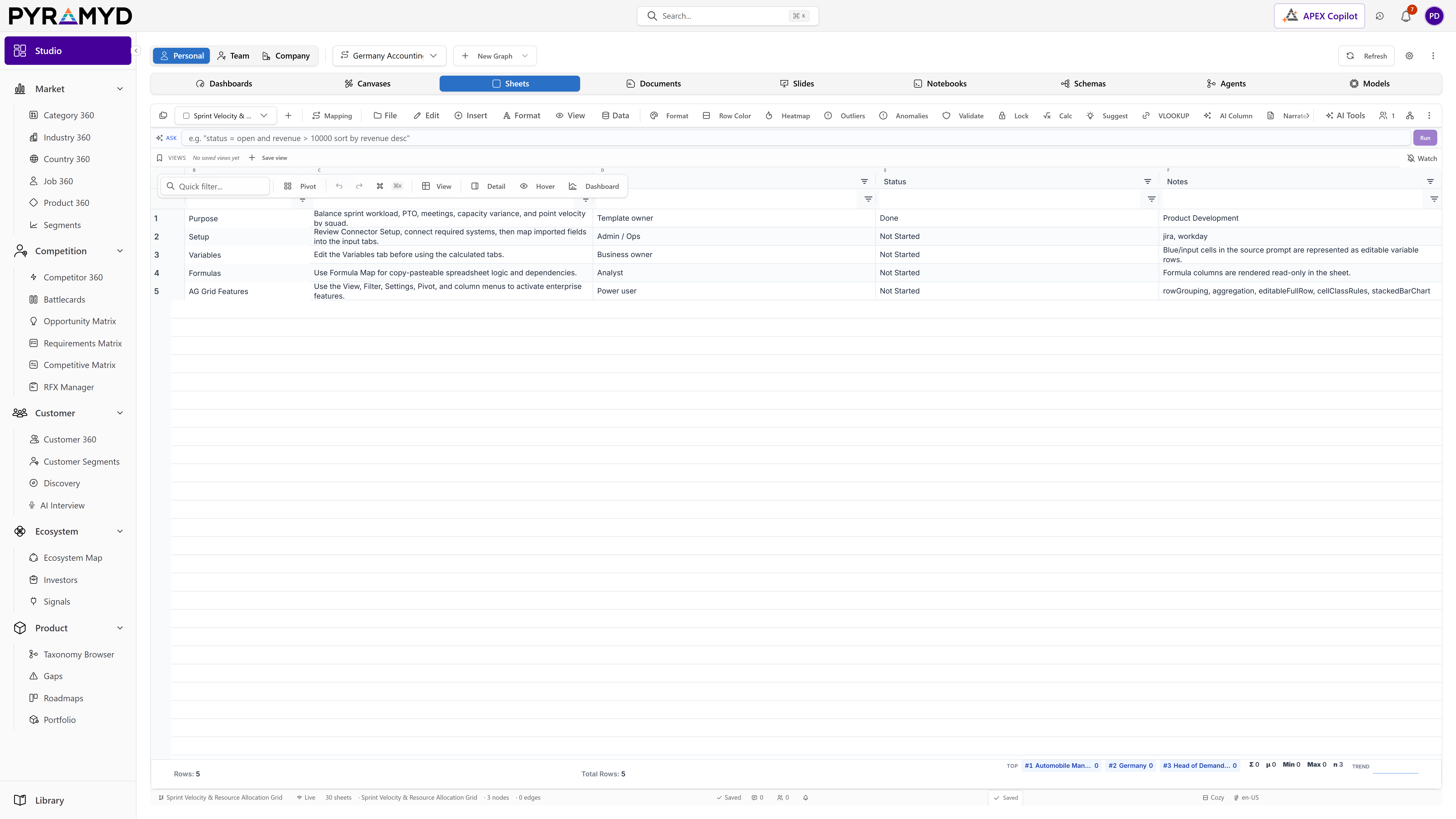
Spreadsheet-native views on the live graph. Edits push back to nodes.

5 top capabilities46 featuresFrom pyd_product_taxonomy

What it is

Studio Sheets — in one paragraph.

Studio Sheets for Product Graph is the spreadsheet authoring surface inside the Studio family. It ships a multi-tab workbook UI, binds any sheet to one of 78 universal node types, supports six bidirectional external connectors, and exposes AI-driven dialogs across cleaning, enrichment, generation, and analysis. It groups capabilities for workbook and sheet management, data source binding, column and cell editing, formulas and calculated columns, validation and data quality, conditional formatting, integrated charts, pivot and aggregation, alternate views, real-time collaboration, threaded comments, sharing and permissions, snapshots and time travel, saved views, watch lists, webhooks, theming and localisation, keyboard and macros, command palette, print and presentation, sticky notes, approvals, trash and recovery, favourites, numeric and date formats, cross-sheet references, state persistence, connector source tracking, telemetry, and error recovery.

Top 5 capabilities

The most-built-out capability set.

Each capability is the parent of dozens of typed features in the production taxonomy. Hover any feature in Studio to drill into the underlying nodes.

01

Column Operations

10 features

Column Operations for Product Graph uses the grid engine's full column API to give every column independent width, pin state (left/right/none), visibility, sort, filter, row-group membership, value-aggregation membership, and pivot membership. State is persisted per-user-per-sheet in user_sheet_view_state and shared via the Saved Views library. The right-side Columns Tool Panel exposes drag-to-arrange, search, and per-column visibility toggles. Header context menus offer rename, autosize, pin, group, sort, and conditional-formatting hooks.

02

Cell Editing

10 features

Cell Editing for Product Graph is built on the grid engine's editing API plus a custom undo/redo stack stored per-user-per-sheet. Single and multi-range selections support type-aware editors (text input, number input, date picker, dropdown for enums, JSON tree editor for JSONB columns, attachment dropzone for file columns). The fill handle, paste-special, format painter, and bulk delete operations all dispatch through a transaction batcher that emits a single sheet_events row per user action so the activity log reads as a coherent narrative.

03

Workbook and Sheet Operations

9 features

Workbook and Sheet Operations for Product Graph organises content into Workbooks, where each Workbook is a Studio asset that contains an ordered list of Sheets. The sheet tab strip at the bottom of the workbook surface mirrors spreadsheet ergonomics so users click plus to add a sheet, double-click to rename, drag to reorder, and right-click to colour-code or duplicate. Workbook-level metadata (title, description, tags, owner, visibility) is shared by every sheet inside it; sheet-level state (column widths, sort, filters, view) is scoped per-sheet. Reordering, renaming, duplicating, deleting, and colour-tagging dispatch to a sheet service that atomically persists to user_sheets with optimistic concurrency.

04

Alternate Views

9 features

Alternate Views for Product Graph render the same underlying data through nine alternate views beyond the default Grid view, each implemented as a dedicated component (FormViewDialog, SheetKanbanView, SheetGalleryView, SheetGanttView, SheetCalendarView, SheetMapView, SheetHierarchyView, SheetSankeyView, SheetHeatmapCalendarView). The view picker lives next to the sheet name in the top bar. Each alternate view inherits the active filter and sort but lays out the data per its own conventions (cards, calendar cells, geo pins, timeline bars, nodes and edges). The active view choice is saved in the active Saved View.

05

Formulas and Calculated Columns

8 features

Formulas and Calculated Columns for Product Graph ships an Excel-compatible formula engine. Users type formulas starting with '=' in any cell or in the dedicated Formula Bar above the grid. Calculated columns extend this: instead of repeating a formula in every row, a column-level formula computes per row using row-relative references (for example =[@Quantity]*[@Price]). Cross-sheet references use Sheet1!A1 syntax; cross-workbook refs use [Workbook]Sheet1!A1. The function library covers 250+ Excel functions across math, stats, finance, text, date, lookup, logical, and information categories, plus 30 Pyramyd-specific functions for graph queries (LOOKUP_NODE, NODE_COUNT, RELATED_NODES).

See Studio Sheets running against your category.

30-minute walkthrough. We'll filter the workspace to your category and walk through the top capabilities live.